DT Compatibility: ✅ This mod is compatible with Dawntrail.
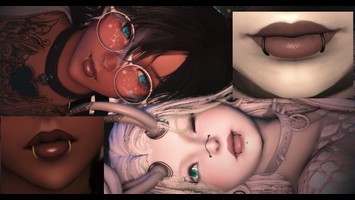
Crisscross Lip Piercing With Nose Ring
Version: 1.0
Gear by Itz Tweakinz
;)
AI Usage: None
Contributor Information:
!!!!!!!!! PLEASE MESSAGE ME IF YOU NOTICE ANY ISSUES !!!!!!!!
THIS MAY NOT FIT TO SOME MOUTH AND NOSE TYPES AND SOME SCULPTS
THIS MAY NOT FIT TO SOME MOUTH AND NOSE TYPES AND SOME SCULPTS
Author's Comments:
Kofi Shop (OPENING SOON) https://ko-fi.com/tweakinz
Follow me on twitter to see my Gposes! https://x.com/ItzTweakinz
DYEABLE:
1. Open Penumbra
2. Select this mod
3. Open "advanced editing"
4. Select the material tab
5. At the top, select the drop down menu and select the green option (depends on which race your using)
6. Use the bullseye on the left side of the colour panels below to determine which one requires changes
7. Make your changes and "Save file" At the top
NOTE: MAY NOT FIT TO ALL NOSE AND LIP TYPES; THIS INCLUDES SCULPTS
Follow me on twitter to see my Gposes! https://x.com/ItzTweakinz
DYEABLE:
1. Open Penumbra
2. Select this mod
3. Open "advanced editing"
4. Select the material tab
5. At the top, select the drop down menu and select the green option (depends on which race your using)
6. Use the bullseye on the left side of the colour panels below to determine which one requires changes
7. Make your changes and "Save file" At the top
NOTE: MAY NOT FIT TO ALL NOSE AND LIP TYPES; THIS INCLUDES SCULPTS
Primary File or Link:
Lip and Nose Piercing - Female - Emperors RIGHT Ring.ttmp2 : [ via Direct Download ]
Other Files and Links:
- Other : [ via ko-fi.com ]
- Other : [ via x.com ]
- Other : [ via discord.gg ]
History:
 Loading Mod History...

Similar Mods