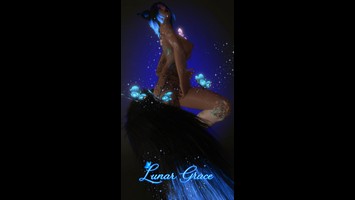
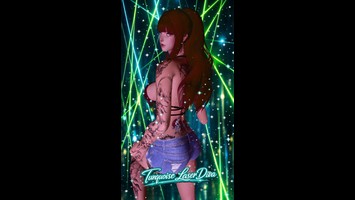
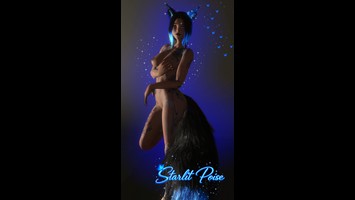
DT Compatibility: ✅ This mod is compatible with Dawntrail.
This mod is a Pose mod, and therefore requires a Posing tool such as Anamnesis or Ktisis to use.
„Celestial Confidence“
Version: 1.0
NSFW Pose by salimosaldian
;)
AI Usage: None
Contributor Information:
“I would also like to express my gratitude here.
Thank you to my model, Mailani Fujiwara, for your patience and your wonderful cooperation.”
Thank you to my model, Mailani Fujiwara, for your patience and your wonderful cooperation.”
Author's Comments:
Here we go again — a brand‑new pose. It should work for all races and characters, even though you’ll always have to adjust things a little. If you want to cut your character out, please — I beg you — use a white background or at least something that contrasts strongly with your character. If you don’t, cutting them out will become a nightmare… just like it did for me.
What you can do next, with lots of love and even more patience:
Create a new layer and spray a blue spot on it (or any color you like). Don’t make it too thick, because now the real work begins. On this layer, start carefully erasing around your character. Lift your pen often — seriously, very often — because if you mess up and hit “Undo” without lifting… well, enjoy starting over. A bathroom break and a snack will help calm your nerves. I don’t swear during this part anymore, so sadly I have no fresh vocabulary to offer. Grab a coffee or an energy drink and just start again. And if absolutely nothing works: please don’t smash your keyboard or throw your monitor out the window. We want to survive this.
To check if you got everything, I like to temporarily hide the main image (the little eye icon on the layer). If you’re unsure, lock the main layer completely — no shifting, no smudging, no accidental scribbling.
I also made myself a folder full of PNGs. I keep adding more and more, and then I browse through it like an old-school catalog to see what fits. All those transparent glitter, stars, hearts, and butterfly layers — I just slap them on top. If I want more or less glow, I adjust the opacity or duplicate the layer — sometimes it feels like 4,598 times. If a layer is too small, I put another one on top, erase until it fits, add another one… and repeat until I’m finally happy. And if nothing works at all, I delete the layer or hit Undo.
In the end, I export the image and throw it into my folder. Since I don’t have much money, I mainly work with GIMP and Krita — and honestly, for this kind of artwork, GIMP is more than enough.
I hope this helped a little. And if you fell asleep halfway through or kicked me out because I’m not a great teacher… please pull me back in, I’d like to eat something soon.
The backgrounds (stars and butterflies) I’m keeping for myself this time. And if you’re looking for the big butterflies — well, many people know where they come from. It’s a little companion.
What you can do next, with lots of love and even more patience:
Create a new layer and spray a blue spot on it (or any color you like). Don’t make it too thick, because now the real work begins. On this layer, start carefully erasing around your character. Lift your pen often — seriously, very often — because if you mess up and hit “Undo” without lifting… well, enjoy starting over. A bathroom break and a snack will help calm your nerves. I don’t swear during this part anymore, so sadly I have no fresh vocabulary to offer. Grab a coffee or an energy drink and just start again. And if absolutely nothing works: please don’t smash your keyboard or throw your monitor out the window. We want to survive this.
To check if you got everything, I like to temporarily hide the main image (the little eye icon on the layer). If you’re unsure, lock the main layer completely — no shifting, no smudging, no accidental scribbling.
I also made myself a folder full of PNGs. I keep adding more and more, and then I browse through it like an old-school catalog to see what fits. All those transparent glitter, stars, hearts, and butterfly layers — I just slap them on top. If I want more or less glow, I adjust the opacity or duplicate the layer — sometimes it feels like 4,598 times. If a layer is too small, I put another one on top, erase until it fits, add another one… and repeat until I’m finally happy. And if nothing works at all, I delete the layer or hit Undo.
In the end, I export the image and throw it into my folder. Since I don’t have much money, I mainly work with GIMP and Krita — and honestly, for this kind of artwork, GIMP is more than enough.
I hope this helped a little. And if you fell asleep halfway through or kicked me out because I’m not a great teacher… please pull me back in, I’d like to eat something soon.
The backgrounds (stars and butterflies) I’m keeping for myself this time. And if you’re looking for the big butterflies — well, many people know where they come from. It’s a little companion.
History:
 Loading Mod History...

Similar Mods