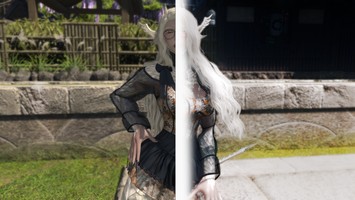
DT Compatibility: ✅ This mod is compatible with Dawntrail.
Alive NEXT
Version: 0.34
Reshade Preset by Yaelle Cry
;)
;)
;)
;)
;)
;)
;)
;)
;)
Contributor Information / AI Usage:
ReShade: https://github.com/crosire/reshade For ReShade
JakobPCoder: https://github.com/JakobPCoder For Motion Estimation (DRME) and Motion Blur
4lex4nder: https://github.com/4lex4nder For the REST Plugin and XIV Preset for REST
Marty: https://www.patreon.com/mcflypg/ For the iMMERESE Pro/Ultimate suite
JakobPCoder: https://github.com/JakobPCoder For Motion Estimation (DRME) and Motion Blur
4lex4nder: https://github.com/4lex4nder For the REST Plugin and XIV Preset for REST
Marty: https://www.patreon.com/mcflypg/ For the iMMERESE Pro/Ultimate suite
Author's Comments:
Updated the WIP of Alive NEXT to V.34
Changed Glamarye Fast Effect's colorspace setting to scRGB, which should fix the gamma issue causing XIV to be either extremely dark or extremely bright. You should now be able to have your in-game gamma at whatever you'd like.
Should also fix the game getting darker or brighter when hiding the UI on some systems.
Updated the REST profile by removing 1 entry in the transformers layer that was causing flickering in select dungeons and raids.
Updated the WIP of Alive NEXT to V.33
Updated the REST profile. Disabled "Preserve Target Layer Alpha" as it now causes ReShade to re-compile every shader effect on selection.
Updated Crashpad and Immpad to use NormalsTexV4 for use with the new update to iMMERSE
Old RTGI effects no longer work. You must be using the 2607 iMMERSE Pro/Ultimate release.
There is a current issue with the new ReLight ADDON version while used with XIV and REST that causes your presets to be reset to default values if you have ReShade's Autosave feature on. Simply turn off Autosave to fix this issue.
Added a new shader to replaces Crashpad called XIV_ImmPad
This replaces the functionality of Crashpad and Launchpad (requires Launchpad to be installed) that feeds in-engine normals and motion vectors to reshade so shaders like iMMERSE_MXAO, RTGI, and ReLIGHT can benefit from game-accurate data.
ReShade 6.7.0 With Full Addon Support at a minimum is required, But Newest ReShade is recommended!
ReShade 6.7.3 With Full Addon Support
Huge thanks to Werin for helping with Alive NEXT
----------------------------------- INSTALLATION -----------------------------------
Alive Installation:
ReShade 6.7.3 With Full Addon Support or newer is recommended, with a minimum of 6.7.0 for Alive NEXT to work.
Extract the contents of Alive_NEXT_WIP_30.zip into XIV's "game" folder. (includes NEXT WIP and older Alive 7 Suite shader presets)
Overwrite existing files.
If you run into issues uninstall reshade, and do a fresh installation.
If you have an Nvidia Graphics Card, please install the DLSS mod from: XIV DLSS MOD
If other issues persist, please check troubleshooting below
----------------------------------- REQUIREMENTS -----------------------------------
ReShade 6.7.0 With Full Addon Support is required, newer versions recommended
In-game settings: Transparent Lighting Quality needs to be set to HIGH (or reshade is gonna shit itself)
----------------------------------- TROUBLESHOOTING ------------------------------
Does the shading looks weird? Almost as if it is Inside the items on the screen, and not where it belongs?
Your depth needs to be inverted!
Open reshade and go to HOME, make sure Performance mode is OFF
Click on the big line below shaders, and above shader settings:
EDIT GLOBAL PREPROCESSOR DEFINITIONS
Then set the:
RESHADE_DEPTH_INPUT_IS_REVERSED
and change it to:
1
If you do not have RESHADE_DEPTH_INPUT_IS_REVERSED in your global preprocessor settings, you can add it!
Just press that + icon, and Copy Paste the code from the post here, then set that to 1.
----------------------------------------------------------------------------------------------
Game is extremely dark normally or inside of cutscenes or when UI is hidden:
Check your IN-GAME gamma settings. If it is on 50 try any other number. 49 or 51 works best.
Is your Gamma already 49 or 51?
Set it to 50!
Due to how XIV renders layers, sometimes the layer that gamma affects is also the layer that reshade is shovin stuff into.
None of that work?
Go into reshade home, go to glamyre fast effects, and turn off Intelligent Sharpening
If that doesnt work, Try flipping off the other settings.
IF that doesnt work, try disabling iMMERSE Sharpen OR iMMERSE AA
----------------------------------------------------------------------------------------------
Is REST not working for you?
Make sure your ADDON path is
.\
Then place the rest files into the root GAME folder. Restart game.
----------------------------------------------------------------------------------------------
Is AliveLUT.fx not working for you?
Make sure to remove all other lut managers or lut.fx shaders from your reshade-shaders folder.
Somtimes it gets negated by the mere presence of another Lut manager.
You can do this while the game is on. After removing shaders press the RELOAD SHADERS button at the bottom of the Home screen!
----------------------------------------------------------------------------------------------
Did you do the weird 99% FSR trick to get "better graphics":tm:?
Add these lines to ReShade's Global Preprocessor Settings:
RESHADE_DEPTH_INPUT_X_SCALE
RESHADE_DEPTH_INPUT_Y_SCALE
Then set both of them to:
1.01
PLEASE NOTE, Depending on the size of your screen, you might have to INCRESE
this number until it looks correct. Go up by 0.01 at a time (up from
1.01)
----------------------------------------------------------------------------------------------
Want your game to do proper DLSS scaling with the DLSS mod for XIV but it's shutting off reshade?
Go into your Game folder, rename dxgi.dll from reshade (the only dxgi.dll you have) to:
d3d11.dll
Then follow the rest of the instructions from the DLSS mod to achieve better DLSS scaling AND have ReShade on at the same time.
Then set the
RESHADE_DEPTH_INPUT_X_SCALE
RESHADE_DEPTH_INPUT_Y_SCALE
To anywhere between 1.3 to 1.5 depending on what preset you set.
For me, doing the quality preset needed 1.5 exactly
This currently doesn't work properly at all with DLSS scaling and REST with WIP, but some people have reported it does work! Idk why, oh well.
----------------------- DESCRIPTION OF SHADERS -------------------------------------
A list of descriptions for each shader used, not in any particular order:
DRME:
A motion data shader, which reads and generates motion data for use with other shaders.
This is a supporting shader, and does not visually do anything on its own, but it is required for the LinearMotionBlur shader.
Has a medium impact on performance due to the generation of motion data.
LinearMotionBlur:
A motion blur shader that uses motion data generated by DRME to creation motion frame data past frames to predict future frames, mixing them together in areas of high motion to emulate motion blur.
The effect is the best motion blur shader we've had for ReShade to date.
Currently an abandoned project, with a license to build on the existing shader.
Has no performance impact (due to the data generation being in DRME)
Crashpad:
The successor to DRME. Feeds clean XIV Engine motion vectors directly into reshade instead of generating them. Huge increase to performance over DRME and Launchpad.
ReBlur:
The successor to LinearMotionBlur. A linear step up from LinearMotionBlur to a new shader made to use the XIV Engine Motion Vectors fed from CrashPad.
Vort Motion Effects:
Another successor to LinearMotionBlur that also adds Temporal AA along with Motion Blur (Temporal AA is incredibly clean due to the XIV Engine Motion Vectors from Crashpad.
AdaptiveFog:
Usually used for creating nearsighted fog based on user color input. Has been configured for Alive as an atmosphere shader, placing the fog way out in the outer reaches of the game to emulate atmosphere.
In the same way while looking at a far off place in real life, where the air between you and the viewed object would have a noticeable haze, AdaptiveFog has been tuned to XIV's natural color palette to best create the sense of atmosphere.
Has the unfortunate side effect of affecting the sky strongly, however, the ingame sky is pitch black and creates a jarring difference in color against far off objects, which is remedied by AdaptiveFog.
Extremely small performance impact.
Glamarye Fast Effects.
A suite of shaders I found deep in the internet that created the sort of visual effects that I wanted to create with the iMMERSE RTGI shader, at a fraction of the cost.
Where the RTGI shader has accurate color bouncing, however, Fast Effects is inaccurate and fake. I've found, however, for XIV, the effects created by FasteEffects far outperform and outvisualize RTGI in terms of video game appeal. It has the ability to mimic soft shadows, global illumination, detailed character shading, sharpening, and various other small tweaks at 1/10th the cost of each of those shaders individually. Fast Effects is how NEXT is able to deliver stunning visuals while letting you keep your frames.
Has a slight performance impact. Will impact more with higher settings.
AliveLut
A standalone Lut shader made specifically for alive using open source ReShade Shader code.
Applies the Alive lut over the entire screen.
Luts, or, Lookup Tables, have the ability to colorgrade your game based on the final output image, and unlike shaders such as Lightroom and ReGrade, does not need to apply the lut per frame. Instead it sits over the top of the final rendered image and has quite literally 0 performance impact. It's free.
ADOF
An older, but still incredible, depth of field shader from Pascal Glitcher, and part of his older qUINT series of shaders.
Extremely customizable.
High performance impact.
iMMERSE Series:
A suite of shaders by PascalGlitcher. Alive uses the free ones included in the ReShade install, but also has settings/presets for the premium set if a user already has those shaders available.
iMMERSE Launchpad:
Nearly the same type of shader as DRME, but has a lot more functionality built in and is required to have on for nearly ass iMMERSE Effects.
Depending on your system can range from None to Extremely high performance impact.
iMMERSE MXAO
A ambient occlusion shader that adds shading/detail shadows to areas where light would not normally reach, such as the corner of two opposing walls, or around the neck of a character where the light would not normally fully reach.
Has an extremely low to extremely high performance impact depending on the settings.
iMMERSE Sharpen
Sharpens the output image. Can be used with XIV to clear up the naturally blurry image.
No performance impact.
iMMERSE Anti Aliasing
An anti aliasing shader that will anti that aliasing.
To go into more detail, aliasing are the pixelated jaggies on the edges of models. They are more apparent at lower resolutions, and nearly non-existent at 4k.
XIV does not have a natural in-engine method of anti-aliasing and uses the same method as ReShade, which is post process. It's enabled only because Alive already had various immerse effects enabled. However, for Alive NEXT the AA method used is Fast Effects.
Extremely low performance impact
iMMERSE Pro Solaris * (NOT SUPPORTED)
Part of the pro series of shaders.
Solaris is a bloom shader with high accuracy. It is a hidden setting in the many different Alive presets, including NEXT. If present, adds a slight bloom to the entire scene, increasing realism, but also lowering visibility in places like Limsa Lominsa.
No performance impact.
iMMERSE Ultimate: ReLight (NOT SUPPORTED)
Another shader from the pro series of shaders by Pascal.
This is used as a screenshots only shader in the screenies presets.
Adds real, 3d reactive, screen space movable, changeable, editable light sources that cast shadows and react with your in game environment.
Is literal witchcraft.
Extremely high performance impact.
iMMERSE Pro RTGI * (NOT SUPPORTED)
The legendary shader which adds raytraced Global Illumination to the game. If a user has this installed, it will enable you to turn on path tracing for Alive.
Does not turn your game into a fully ray-traced render. Does not improve shadow quality. Does not improve the base graphics at all. Like every other ReShade shader, this is a post process effect that injects it's shader method into your final rendered frame.
Not required, Not recommended, Extremely high performance impact, Not frame friendly, I personally think Glamyarye Fast Effects is better in every way except accuracy.
* Part of pascal's premium shader suite
Part of pascal's higher tier premium shader suite.
I do not in any way support or encourage any user to find, or purchase these shaders. I am in no way involved with or connected to Pascal.
Alive is a project of passion, and will never be paywalled to function.
Changed Glamarye Fast Effect's colorspace setting to scRGB, which should fix the gamma issue causing XIV to be either extremely dark or extremely bright. You should now be able to have your in-game gamma at whatever you'd like.
Should also fix the game getting darker or brighter when hiding the UI on some systems.
Updated the REST profile by removing 1 entry in the transformers layer that was causing flickering in select dungeons and raids.
Updated the WIP of Alive NEXT to V.33
Updated the REST profile. Disabled "Preserve Target Layer Alpha" as it now causes ReShade to re-compile every shader effect on selection.
Updated Crashpad and Immpad to use NormalsTexV4 for use with the new update to iMMERSE
Old RTGI effects no longer work. You must be using the 2607 iMMERSE Pro/Ultimate release.
There is a current issue with the new ReLight ADDON version while used with XIV and REST that causes your presets to be reset to default values if you have ReShade's Autosave feature on. Simply turn off Autosave to fix this issue.
Added a new shader to replaces Crashpad called XIV_ImmPad
This replaces the functionality of Crashpad and Launchpad (requires Launchpad to be installed) that feeds in-engine normals and motion vectors to reshade so shaders like iMMERSE_MXAO, RTGI, and ReLIGHT can benefit from game-accurate data.
ReShade 6.7.0 With Full Addon Support at a minimum is required, But Newest ReShade is recommended!
ReShade 6.7.3 With Full Addon Support
Huge thanks to Werin for helping with Alive NEXT
----------------------------------- INSTALLATION -----------------------------------
Alive Installation:
ReShade 6.7.3 With Full Addon Support or newer is recommended, with a minimum of 6.7.0 for Alive NEXT to work.
Extract the contents of Alive_NEXT_WIP_30.zip into XIV's "game" folder. (includes NEXT WIP and older Alive 7 Suite shader presets)
Overwrite existing files.
If you run into issues uninstall reshade, and do a fresh installation.
If you have an Nvidia Graphics Card, please install the DLSS mod from: XIV DLSS MOD
If other issues persist, please check troubleshooting below
----------------------------------- REQUIREMENTS -----------------------------------
ReShade 6.7.0 With Full Addon Support is required, newer versions recommended
In-game settings: Transparent Lighting Quality needs to be set to HIGH (or reshade is gonna shit itself)
----------------------------------- TROUBLESHOOTING ------------------------------
Does the shading looks weird? Almost as if it is Inside the items on the screen, and not where it belongs?
Your depth needs to be inverted!
Open reshade and go to HOME, make sure Performance mode is OFF
Click on the big line below shaders, and above shader settings:
EDIT GLOBAL PREPROCESSOR DEFINITIONS
Then set the:
RESHADE_DEPTH_INPUT_IS_REVERSED
and change it to:
1
If you do not have RESHADE_DEPTH_INPUT_IS_REVERSED in your global preprocessor settings, you can add it!
Just press that + icon, and Copy Paste the code from the post here, then set that to 1.
----------------------------------------------------------------------------------------------
Game is extremely dark normally or inside of cutscenes or when UI is hidden:
Check your IN-GAME gamma settings. If it is on 50 try any other number. 49 or 51 works best.
Is your Gamma already 49 or 51?
Set it to 50!
Due to how XIV renders layers, sometimes the layer that gamma affects is also the layer that reshade is shovin stuff into.
None of that work?
Go into reshade home, go to glamyre fast effects, and turn off Intelligent Sharpening
If that doesnt work, Try flipping off the other settings.
IF that doesnt work, try disabling iMMERSE Sharpen OR iMMERSE AA
----------------------------------------------------------------------------------------------
Is REST not working for you?
Make sure your ADDON path is
.\
Then place the rest files into the root GAME folder. Restart game.
----------------------------------------------------------------------------------------------
Is AliveLUT.fx not working for you?
Make sure to remove all other lut managers or lut.fx shaders from your reshade-shaders folder.
Somtimes it gets negated by the mere presence of another Lut manager.
You can do this while the game is on. After removing shaders press the RELOAD SHADERS button at the bottom of the Home screen!
----------------------------------------------------------------------------------------------
Did you do the weird 99% FSR trick to get "better graphics":tm:?
Add these lines to ReShade's Global Preprocessor Settings:
RESHADE_DEPTH_INPUT_X_SCALE
RESHADE_DEPTH_INPUT_Y_SCALE
Then set both of them to:
1.01
PLEASE NOTE, Depending on the size of your screen, you might have to INCRESE
this number until it looks correct. Go up by 0.01 at a time (up from
1.01)
----------------------------------------------------------------------------------------------
Want your game to do proper DLSS scaling with the DLSS mod for XIV but it's shutting off reshade?
Go into your Game folder, rename dxgi.dll from reshade (the only dxgi.dll you have) to:
d3d11.dll
Then follow the rest of the instructions from the DLSS mod to achieve better DLSS scaling AND have ReShade on at the same time.
Then set the
RESHADE_DEPTH_INPUT_X_SCALE
RESHADE_DEPTH_INPUT_Y_SCALE
To anywhere between 1.3 to 1.5 depending on what preset you set.
For me, doing the quality preset needed 1.5 exactly
This currently doesn't work properly at all with DLSS scaling and REST with WIP, but some people have reported it does work! Idk why, oh well.
----------------------- DESCRIPTION OF SHADERS -------------------------------------
A list of descriptions for each shader used, not in any particular order:
DRME:
A motion data shader, which reads and generates motion data for use with other shaders.
This is a supporting shader, and does not visually do anything on its own, but it is required for the LinearMotionBlur shader.
Has a medium impact on performance due to the generation of motion data.
LinearMotionBlur:
A motion blur shader that uses motion data generated by DRME to creation motion frame data past frames to predict future frames, mixing them together in areas of high motion to emulate motion blur.
The effect is the best motion blur shader we've had for ReShade to date.
Currently an abandoned project, with a license to build on the existing shader.
Has no performance impact (due to the data generation being in DRME)
Crashpad:
The successor to DRME. Feeds clean XIV Engine motion vectors directly into reshade instead of generating them. Huge increase to performance over DRME and Launchpad.
ReBlur:
The successor to LinearMotionBlur. A linear step up from LinearMotionBlur to a new shader made to use the XIV Engine Motion Vectors fed from CrashPad.
Vort Motion Effects:
Another successor to LinearMotionBlur that also adds Temporal AA along with Motion Blur (Temporal AA is incredibly clean due to the XIV Engine Motion Vectors from Crashpad.
AdaptiveFog:
Usually used for creating nearsighted fog based on user color input. Has been configured for Alive as an atmosphere shader, placing the fog way out in the outer reaches of the game to emulate atmosphere.
In the same way while looking at a far off place in real life, where the air between you and the viewed object would have a noticeable haze, AdaptiveFog has been tuned to XIV's natural color palette to best create the sense of atmosphere.
Has the unfortunate side effect of affecting the sky strongly, however, the ingame sky is pitch black and creates a jarring difference in color against far off objects, which is remedied by AdaptiveFog.
Extremely small performance impact.
Glamarye Fast Effects.
A suite of shaders I found deep in the internet that created the sort of visual effects that I wanted to create with the iMMERSE RTGI shader, at a fraction of the cost.
Where the RTGI shader has accurate color bouncing, however, Fast Effects is inaccurate and fake. I've found, however, for XIV, the effects created by FasteEffects far outperform and outvisualize RTGI in terms of video game appeal. It has the ability to mimic soft shadows, global illumination, detailed character shading, sharpening, and various other small tweaks at 1/10th the cost of each of those shaders individually. Fast Effects is how NEXT is able to deliver stunning visuals while letting you keep your frames.
Has a slight performance impact. Will impact more with higher settings.
AliveLut
A standalone Lut shader made specifically for alive using open source ReShade Shader code.
Applies the Alive lut over the entire screen.
Luts, or, Lookup Tables, have the ability to colorgrade your game based on the final output image, and unlike shaders such as Lightroom and ReGrade, does not need to apply the lut per frame. Instead it sits over the top of the final rendered image and has quite literally 0 performance impact. It's free.
ADOF
An older, but still incredible, depth of field shader from Pascal Glitcher, and part of his older qUINT series of shaders.
Extremely customizable.
High performance impact.
iMMERSE Series:
A suite of shaders by PascalGlitcher. Alive uses the free ones included in the ReShade install, but also has settings/presets for the premium set if a user already has those shaders available.
iMMERSE Launchpad:
Nearly the same type of shader as DRME, but has a lot more functionality built in and is required to have on for nearly ass iMMERSE Effects.
Depending on your system can range from None to Extremely high performance impact.
iMMERSE MXAO
A ambient occlusion shader that adds shading/detail shadows to areas where light would not normally reach, such as the corner of two opposing walls, or around the neck of a character where the light would not normally fully reach.
Has an extremely low to extremely high performance impact depending on the settings.
iMMERSE Sharpen
Sharpens the output image. Can be used with XIV to clear up the naturally blurry image.
No performance impact.
iMMERSE Anti Aliasing
An anti aliasing shader that will anti that aliasing.
To go into more detail, aliasing are the pixelated jaggies on the edges of models. They are more apparent at lower resolutions, and nearly non-existent at 4k.
XIV does not have a natural in-engine method of anti-aliasing and uses the same method as ReShade, which is post process. It's enabled only because Alive already had various immerse effects enabled. However, for Alive NEXT the AA method used is Fast Effects.
Extremely low performance impact
iMMERSE Pro Solaris * (NOT SUPPORTED)
Part of the pro series of shaders.
Solaris is a bloom shader with high accuracy. It is a hidden setting in the many different Alive presets, including NEXT. If present, adds a slight bloom to the entire scene, increasing realism, but also lowering visibility in places like Limsa Lominsa.
No performance impact.
iMMERSE Ultimate: ReLight (NOT SUPPORTED)
Another shader from the pro series of shaders by Pascal.
This is used as a screenshots only shader in the screenies presets.
Adds real, 3d reactive, screen space movable, changeable, editable light sources that cast shadows and react with your in game environment.
Is literal witchcraft.
Extremely high performance impact.
iMMERSE Pro RTGI * (NOT SUPPORTED)
The legendary shader which adds raytraced Global Illumination to the game. If a user has this installed, it will enable you to turn on path tracing for Alive.
Does not turn your game into a fully ray-traced render. Does not improve shadow quality. Does not improve the base graphics at all. Like every other ReShade shader, this is a post process effect that injects it's shader method into your final rendered frame.
Not required, Not recommended, Extremely high performance impact, Not frame friendly, I personally think Glamyarye Fast Effects is better in every way except accuracy.
* Part of pascal's premium shader suite
Part of pascal's higher tier premium shader suite.
I do not in any way support or encourage any user to find, or purchase these shaders. I am in no way involved with or connected to Pascal.
Alive is a project of passion, and will never be paywalled to function.
Primary File or Link:
Alive NEXT WIP 34 Stable.zip : [ via Direct Download ]
Other Files and Links:
- Alive NEXT (RTGI) WIP 34 Experimental.zip : [ via Direct Download ]
- Download : [ via nexusmods.com ]
- ReShade 6.7.3 With Full Addon Support : [ via reshade.me ]
- Other : [ via github.com ]
- Other : [ via github.com ]
- Other : [ via github.com ]
- Other : [ via patreon.com ]
- Other : [ via reshade.me ]
History:
 Loading Mod History...

Similar Mods