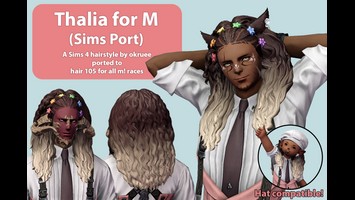
DT Compatibility: This mod is not Penumbra-Compatible in Dawntrail, but may be made so via TexTools.
Thalia for F (Sims Port)
Version: 1.0
Hair by rasplejax
;)
Contributor Information / AI Usage Specifics:
Credits:
Thalia: okruee
www.patreon.com/posts/thalia-hair-44996047
Thalia: okruee
www.patreon.com/posts/thalia-hair-44996047
Author's Comments:
A port of a Sims 4 hair called Thalia by okruee. Uses a combination of the original textures and vanilla XIV textures.
Applies to hair 118 for all f! races. Additional previews on ko-fi.
Please see my ko-fi main page/XMA profile for TOS & permissions.
This mod uses assets from other mods. If you make edits, please ensure you’re acting within the permissions of the credited creators.
Known issues:
I tried to reduce clipping as much as possible, but there is still some clipping between the hair and the shoulder in some poses/animations. This is most prominent on lalafell.
This port had a lot of moving parts. If you find other issues, please feel free to reach out and I'll do my best to fix them!
Update 4/20/24
I received a request to add an earless miqo'te option, and I realized the workaround I came up with for the viera port would need an earless option, too. I included two earless options for both miqo and viera that I'm hoping will be compatible with different ear replacements mods.
I also made a texture edit that allows each flower clip to be colored individually. I added pink and rainbow colorset options, and you can colorset edit them any colors you like!
Update 4/20/24 x2
I was alerted to some clipping issues with elezen ears. I also found a similar issue with lalafell ears. This has been fixed! There may still be a little bit of clipping around the edges of the ears in certain shapes/lengths, but nothing poking through!
HOW TO RE-COLOR:
TEXTOOLS
After installation:
- Under the By Category viewer, expand Character > Hair.
- Select Hyur Midlander Female.
- Under the Textures tab, select hair 118 from the leftmost drop down menu.
- From the center drop down menu, select the material ending in hir_d.
- From the top right drop down menu, select the ColorSet.
- Edit rows 1 through 6 as you please!
- Click Save.
PENUMBRA
After installation:
- Select the mod and click the Advanced Editing tab.
- A new window will open. Click the Materials tab.
- From the drop down menu, select the material ending in _d
(There will be two options, Pink or Rainbow. Select whichever version you have active.)
- Edit rows 1 through 6 as you please!
- Beneath the drop down menu, click Save to File.
- In the main Penumbra window, click Redraw for self/target/etc.
Applies to hair 118 for all f! races. Additional previews on ko-fi.
Please see my ko-fi main page/XMA profile for TOS & permissions.
This mod uses assets from other mods. If you make edits, please ensure you’re acting within the permissions of the credited creators.
Known issues:
I tried to reduce clipping as much as possible, but there is still some clipping between the hair and the shoulder in some poses/animations. This is most prominent on lalafell.
This port had a lot of moving parts. If you find other issues, please feel free to reach out and I'll do my best to fix them!
Update 4/20/24
I received a request to add an earless miqo'te option, and I realized the workaround I came up with for the viera port would need an earless option, too. I included two earless options for both miqo and viera that I'm hoping will be compatible with different ear replacements mods.
I also made a texture edit that allows each flower clip to be colored individually. I added pink and rainbow colorset options, and you can colorset edit them any colors you like!
Update 4/20/24 x2
I was alerted to some clipping issues with elezen ears. I also found a similar issue with lalafell ears. This has been fixed! There may still be a little bit of clipping around the edges of the ears in certain shapes/lengths, but nothing poking through!
HOW TO RE-COLOR:
TEXTOOLS
After installation:
- Under the By Category viewer, expand Character > Hair.
- Select Hyur Midlander Female.
- Under the Textures tab, select hair 118 from the leftmost drop down menu.
- From the center drop down menu, select the material ending in hir_d.
- From the top right drop down menu, select the ColorSet.
- Edit rows 1 through 6 as you please!
- Click Save.
PENUMBRA
After installation:
- Select the mod and click the Advanced Editing tab.
- A new window will open. Click the Materials tab.
- From the drop down menu, select the material ending in _d
(There will be two options, Pink or Rainbow. Select whichever version you have active.)
- Edit rows 1 through 6 as you please!
- Beneath the drop down menu, click Save to File.
- In the main Penumbra window, click Redraw for self/target/etc.
Primary File or Link:
Thalia for F (Sims Port).ttmp2 : [ via Direct Download ]
Other Files and Links:
- Ko-fi : [ via ko-fi.com ]
- Other : [ via patreon.com ]
History:
 Loading Mod History...

Similar Mods