DT Compatibility: ✅ This mod is compatible with Dawntrail.
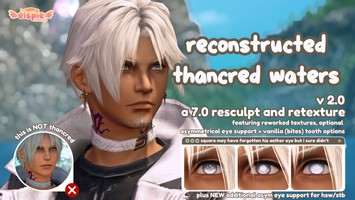
Rescrunkled 7.0 Thancred
Version: 2.0
Face by funny lizar/peachy (MOVED TO HS)
;)
AI Usage: None
Contributor Information:
Squenix for vanilla textures + models
Sel and the rest of the amazing TexTools team
ganbureika for the 6.58 customizable Thancred mod that I sorta reverse engineered a while ago to get this one to work
Sel and the rest of the amazing TexTools team
ganbureika for the 6.58 customizable Thancred mod that I sorta reverse engineered a while ago to get this one to work
Author's Comments:
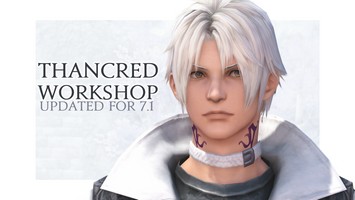
UPDATE 7/1: Now included in the download is an additional version of the modpack that DOES NOT have heterochromia or stubble, only the adjusted lips. Also included is a raw file for making Thancred's lashes dye white with the rest of his hair, as shown on the preview.
Squenix works hard but blorbo derangement syndrome works harder. 💪
A combination of a few different edits to Thancred's updated unique face model, just something quick I threw together yesterday so I can have Mr. Cred the way I like him for MSQ. Rundown of the edits include:
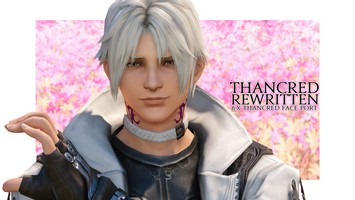
-Lips slightly sculpted to give him his cute pout back (first Estinien now Thancred? what does Squenix have against luscious man lips? smh). This sculpt ONLY has his lips edited and nothing else. If you'd like more extensive edits to his face to make him look even closer to his original pre-Dawntrail appearance, there are many other Thancred edit mods out there now. I actually don't even use this one anymore to be honest, I use izzy's Thancred Rewritten and it's a very good fix!
-Optional version that also restores Thancred's Heavensward heterochromia and stubble alongside the lip fix. Honestly I think you should probably just use Glamourer automations to give him the heterochromia instead of my jank-ass edit, now that Glamourer is back up, and I think(?) it can toggle on the stubble too, but if you're allergic to using Glamourer for whatever reason then I guess you can use this.
-Optional file for making Thancred's eyelashes dye white with the rest of his hair
This SHOULD only affect Shadowbringers+ Thancred's face model, as it gives him unique eye texture paths that aren't shared by any other race. But bear with me if there's any issues coz I literally threw this together the day before early access and my Dawntrail-specific modding knowledge is still shaky (as is everyone else's probably, lmao).
IF YOU WANT TO REPLACE THE HETEROCHROMIA EYE TEXTURES WITH A DIFFERENT SET, it's fairly simple— make sure they're 7.0 compatible and double them up to match the layout of the included iris textures. The texture resolution should be a ratio of 2x1 (eg 4096x2048, 256x128, etc) . I recommend flipping the left eye horizontally on both the diffuse and mask, but NOT the normal map. In an image editor, overlay your desired color onto the iris part of the eye diffuse. To ensure the color change isn't overwritten by the in-game eye color, remove ALL the blue channel data from the mask via PS or GIMP (it should be all green and red, no blue). Then simply import them over the included doubled iris textures. NON-DOUBLED EYE TEXTURES WILL NOT WORK due to how I had to change the eye UV mapping to support heterochromia.
Please don't use this for bigot shit, or for making underage NSFW or adult x minor shipping with Thancred. I am really deeply uncomfortable with my work being used for that kind of thing. Thanks for your understanding.
Squenix works hard but blorbo derangement syndrome works harder. 💪
A combination of a few different edits to Thancred's updated unique face model, just something quick I threw together yesterday so I can have Mr. Cred the way I like him for MSQ. Rundown of the edits include:
-Lips slightly sculpted to give him his cute pout back (first Estinien now Thancred? what does Squenix have against luscious man lips? smh). This sculpt ONLY has his lips edited and nothing else. If you'd like more extensive edits to his face to make him look even closer to his original pre-Dawntrail appearance, there are many other Thancred edit mods out there now. I actually don't even use this one anymore to be honest, I use izzy's Thancred Rewritten and it's a very good fix!
-Optional version that also restores Thancred's Heavensward heterochromia and stubble alongside the lip fix. Honestly I think you should probably just use Glamourer automations to give him the heterochromia instead of my jank-ass edit, now that Glamourer is back up, and I think(?) it can toggle on the stubble too, but if you're allergic to using Glamourer for whatever reason then I guess you can use this.
-Optional file for making Thancred's eyelashes dye white with the rest of his hair
This SHOULD only affect Shadowbringers+ Thancred's face model, as it gives him unique eye texture paths that aren't shared by any other race. But bear with me if there's any issues coz I literally threw this together the day before early access and my Dawntrail-specific modding knowledge is still shaky (as is everyone else's probably, lmao).
IF YOU WANT TO REPLACE THE HETEROCHROMIA EYE TEXTURES WITH A DIFFERENT SET, it's fairly simple— make sure they're 7.0 compatible and double them up to match the layout of the included iris textures. The texture resolution should be a ratio of 2x1 (eg 4096x2048, 256x128, etc) . I recommend flipping the left eye horizontally on both the diffuse and mask, but NOT the normal map. In an image editor, overlay your desired color onto the iris part of the eye diffuse. To ensure the color change isn't overwritten by the in-game eye color, remove ALL the blue channel data from the mask via PS or GIMP (it should be all green and red, no blue). Then simply import them over the included doubled iris textures. NON-DOUBLED EYE TEXTURES WILL NOT WORK due to how I had to change the eye UV mapping to support heterochromia.
Please don't use this for bigot shit, or for making underage NSFW or adult x minor shipping with Thancred. I am really deeply uncomfortable with my work being used for that kind of thing. Thanks for your understanding.
History:
 Loading Mod History...

Similar Mods