DT Compatibility: ✅ This mod is compatible with Dawntrail.
Cutscene Control Camera Pack
Version: 1.0
Dalamud Plugin by synthetic
;)
Author's Comments:
for another half pack & other misc stuff, see this drive folder (the current home of all these files): https://drive.google.com/drive/folders/1AUDRHGVg3IjZ4GEDyOgiaj7hKOyjN_GT?usp=drive_link
WHAT IS THIS? This is a folder of 60 different basic camera motions (and a few ones for specific emotes) playable using Brio's Cutscene Control, animated by me!
WHAT'S IT FOR? Use these in any way you can think of to film machinima, memes, mod previews, etc using camera movements not possible otherwise, controller or no controller. This pack includes zooms, dolly shots, tilts, rolls, booms, and more as .xcp camera files.
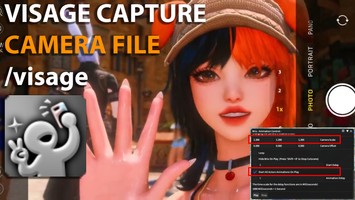
HOW DO I USE THEM? The only thing you need is Brio (and filming software, if you wish to record.) In Brio, find the Animation tab, click on the arrow to go to "Advanced Animation Control" and Cutscene Control will be at the bottom. Click "Browse," select one of the camera files, make sure to select the emote you desire in the Animation Control window/tab, and then click play!
The camera motion will play according to the currently selected character in the Gpose mode. If the character is set to "Look at the camera," then their facial direction and eye gaze will not reflect the camera movement itself. They will remain static to the actual game camera.
"Start All Actors Animations On Play" will start both the camera movement and your selected emote at exactly the same time, or you can use "Start Delay" to delay camera motion start or "Animation Delay" to delay the emote start. All of these options will disable Speed Control on start. If you wish to film with Speed Control enabled for an emote, you will have to start the camera and the emote separately manually.
HOW DO I ADJUST THEM FOR MY CHARACTER? Every single one of these movements were created around a max height Midlander male model. To adjust to your own character, change the numbers for "Camera Scale" or "Camera Offset" by increments of 0.1 or less.
Camera Scale, more or less, can adjust how much of the screen your character takes up. For example, you will change the camera scale to make the screen fit either a M Hrothgar/Roe/Auri or Lalafell character. Taller characters seem to benefit from the scale being 1.2, 1.2, 1.2. Lalafells seem to work better when the scale is set to 0.5, 0.5, 0.5. But please adjust further.
Camera Offset changes the position of the camera itself. For example, if you want to include two characters in a scene, you can adjust the offset so the camera is sort of "off to the side" to show both of them. You can also adjust these if your camera is just slightly off from being perfect or centered. Depending on the emote, some cameras will not appear centered. You can also hide your character in the Brio menu to film scenery, and use the offset to help frame your shot. Camera offset can also entirely change the framing of a shot even just for a single character.
This pack includes camera motions for the Cutscene Walk animation ported to an emote by Linku! Download it here: https://trello.com/c/UlqqOkRN/135-cut-walk-kneel-lookout
This pack includes specific animations for the following emotes: Advent of Light, Bouquet, and Bubbles. Bouquet is designed for two characters, which is troublesome of itself to position, and may also give you a hard time since the emote will start over rather quickly. I used Brio to change the Bouquet giver from the intro version of the emote to the full version once they crouched down.
These camera motions are not designed to be used with the "Loop" option.
I use OBS to film, which has an option to hide third party overlays and your cursor. This can allow you to control the entire Brio interface while the camera motion plays, and can be very handy for achieving specific scenes, such as a character using different emotes, or characters speaking.
I can't control what you do with these motions, but please don't do or film anything that causes or perpetuates harm to others.
Video Preview (only some motions shown): https://bsky.app/profile/turntechknight.bsky.social/post/3lk7w3xvgrc23
WHAT IS THIS? This is a folder of 60 different basic camera motions (and a few ones for specific emotes) playable using Brio's Cutscene Control, animated by me!
WHAT'S IT FOR? Use these in any way you can think of to film machinima, memes, mod previews, etc using camera movements not possible otherwise, controller or no controller. This pack includes zooms, dolly shots, tilts, rolls, booms, and more as .xcp camera files.
HOW DO I USE THEM? The only thing you need is Brio (and filming software, if you wish to record.) In Brio, find the Animation tab, click on the arrow to go to "Advanced Animation Control" and Cutscene Control will be at the bottom. Click "Browse," select one of the camera files, make sure to select the emote you desire in the Animation Control window/tab, and then click play!
The camera motion will play according to the currently selected character in the Gpose mode. If the character is set to "Look at the camera," then their facial direction and eye gaze will not reflect the camera movement itself. They will remain static to the actual game camera.
"Start All Actors Animations On Play" will start both the camera movement and your selected emote at exactly the same time, or you can use "Start Delay" to delay camera motion start or "Animation Delay" to delay the emote start. All of these options will disable Speed Control on start. If you wish to film with Speed Control enabled for an emote, you will have to start the camera and the emote separately manually.
HOW DO I ADJUST THEM FOR MY CHARACTER? Every single one of these movements were created around a max height Midlander male model. To adjust to your own character, change the numbers for "Camera Scale" or "Camera Offset" by increments of 0.1 or less.
Camera Scale, more or less, can adjust how much of the screen your character takes up. For example, you will change the camera scale to make the screen fit either a M Hrothgar/Roe/Auri or Lalafell character. Taller characters seem to benefit from the scale being 1.2, 1.2, 1.2. Lalafells seem to work better when the scale is set to 0.5, 0.5, 0.5. But please adjust further.
Camera Offset changes the position of the camera itself. For example, if you want to include two characters in a scene, you can adjust the offset so the camera is sort of "off to the side" to show both of them. You can also adjust these if your camera is just slightly off from being perfect or centered. Depending on the emote, some cameras will not appear centered. You can also hide your character in the Brio menu to film scenery, and use the offset to help frame your shot. Camera offset can also entirely change the framing of a shot even just for a single character.
This pack includes camera motions for the Cutscene Walk animation ported to an emote by Linku! Download it here: https://trello.com/c/UlqqOkRN/135-cut-walk-kneel-lookout
This pack includes specific animations for the following emotes: Advent of Light, Bouquet, and Bubbles. Bouquet is designed for two characters, which is troublesome of itself to position, and may also give you a hard time since the emote will start over rather quickly. I used Brio to change the Bouquet giver from the intro version of the emote to the full version once they crouched down.
These camera motions are not designed to be used with the "Loop" option.
I use OBS to film, which has an option to hide third party overlays and your cursor. This can allow you to control the entire Brio interface while the camera motion plays, and can be very handy for achieving specific scenes, such as a character using different emotes, or characters speaking.
I can't control what you do with these motions, but please don't do or film anything that causes or perpetuates harm to others.
Video Preview (only some motions shown): https://bsky.app/profile/turntechknight.bsky.social/post/3lk7w3xvgrc23
Primary File or Link:
Basic Camera Pack.zip : [ via Direct Download ]
Other Files and Links:
- Other : [ via trello.com ]
- Other : [ via bsky.app ]
- Download : [ via drive.google.com ]
History:
 Loading Mod History...

Similar Mods