DT Compatibility: ✅ This mod is compatible with Dawntrail.
Arch - Alternative Shirt/Trousers
Version: 1.0
Gear by no
;)
Contributor Information / AI Usage:
SE for original models and textures
Tsar - TBSE - https://heliosphere.app/mod/tbse
Mimi - TBSE Slim - https://www.xivmodarchive.com/modid/35198
chibilordcthulhu, Lunar Eclipse & Crow - SBTL - https://www.xivmodarchive.com/modid/72583
Tsar - TBSE - https://heliosphere.app/mod/tbse
Mimi - TBSE Slim - https://www.xivmodarchive.com/modid/35198
chibilordcthulhu, Lunar Eclipse & Crow - SBTL - https://www.xivmodarchive.com/modid/72583
Author's Comments:
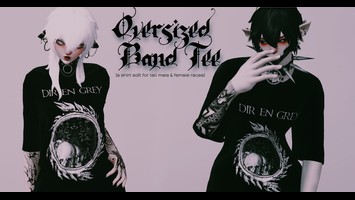
- Just a simple upscale -
- Midlander bases only -
- Most of this should be basic C+ friendly -
Your basic upscale with a side of texture spice
- [You can indeed change the graphic on the shirt]
Thumbnail uses slight C+
Alternative Shirt
- Includes vanilla shaped version, and a slightly longer sleeve version for models
- No clipping seen normally, but might be there in extreme poses
- Vanilla, MOTHS w/ tattoos, MOTHS w/o tattoos, and no tattoos included as textures [Since these are only textures, these work for any upscale/shaders]
- MOTHS!!!!!
Alternative Trousers
- Includes a simple upscale of the bottoms
- No clipping seen normally, but might be there in extreme poses
- Vanilla, only chains, mixed, only thigh detail, and no chains are included as textures [Since these are only textures, these work for any upscale/shaders]
If you are interested, here's a tutorial on how to change the graphic. Step I - Get the norm file [texttools/penumbra works | Step II - Use #808000 to block out the vanilla design | Step III - Use #8080FF for the color of your design. Make sure it's a symmetrical design, and line it up at the cut line of the front panel | Step IV - Go and test your design [This is the pathway for the norm texture -> chara/equipment/e6229/texture/v01_c0101e6229_top_norm.tex] | You don't technically need to change the mask file, unless you hate how the shirt texture overlays on your graphic [Same process, different colors] | No need to change the id file at all | If you need help setting up the mod, there are many tutorials out there already that will explain it better than I can | Have fun!
- Permissions -
Others perms before mine
Don't say you made the upscale
You can uses these textures for public upscales and edits [Must be free]
Don't reupload
- Midlander bases only -
- Most of this should be basic C+ friendly -
Your basic upscale with a side of texture spice
- [You can indeed change the graphic on the shirt]
Thumbnail uses slight C+
Alternative Shirt
- Includes vanilla shaped version, and a slightly longer sleeve version for models
- No clipping seen normally, but might be there in extreme poses
- Vanilla, MOTHS w/ tattoos, MOTHS w/o tattoos, and no tattoos included as textures [Since these are only textures, these work for any upscale/shaders]
- MOTHS!!!!!
Alternative Trousers
- Includes a simple upscale of the bottoms
- No clipping seen normally, but might be there in extreme poses
- Vanilla, only chains, mixed, only thigh detail, and no chains are included as textures [Since these are only textures, these work for any upscale/shaders]
If you are interested, here's a tutorial on how to change the graphic. Step I - Get the norm file [texttools/penumbra works | Step II - Use #808000 to block out the vanilla design | Step III - Use #8080FF for the color of your design. Make sure it's a symmetrical design, and line it up at the cut line of the front panel | Step IV - Go and test your design [This is the pathway for the norm texture -> chara/equipment/e6229/texture/v01_c0101e6229_top_norm.tex] | You don't technically need to change the mask file, unless you hate how the shirt texture overlays on your graphic [Same process, different colors] | No need to change the id file at all | If you need help setting up the mod, there are many tutorials out there already that will explain it better than I can | Have fun!
- Permissions -
Others perms before mine
Don't say you made the upscale
You can uses these textures for public upscales and edits [Must be free]
Don't reupload
Primary File or Link:
Alternative Shirt-Trousers [Arch].pmp : [ via Direct Download ]
Other Files and Links:
- Other : [ via xivmodarchive.com ]
- Other : [ via heliosphere.app ]
- Other : [ via xivmodarchive.com ]
History:
 Loading Mod History...
Similar Mods