DT Compatibility: ✅ This mod is compatible with Dawntrail.
Penumbra & Glamourer Preview Manager
Version: 1.1
Dalamud Plugin by KaraRemy
;)
AI Usage: None
Author's Comments:
Important Notice: I had to make some changes to plugin details and repositories. I did my best to keep this as low-impact as possible, but you might get errors of a missing repository for my plugins. If this happens, you can uninstall/delete the "old" plugins and reinstall them from the "Available Plugins" list. This should not delete any previews or settings you made.
To be safe, change the custom repo url to:
https://raw.githubusercontent.com/KaraRemy/TomokPlugins/main/pluginmaster.json
I sincerely apologize for any inconvenience this caused, but it was a neccessary change.
Penumbra Preview Manager (PPM)
Visual Mod Previews Directly Inside Penumbra!
Tired of clicking through options blindly? Penumbra Preview Manager (PPM) is a companion plugin that injects visual preview cards directly inside your native Penumbra Mod Settings window!
Key Features:
- Seamless GUI Integration: Previews render natively inside Penumbra's details pane (above your mod tabs).
- Option Previews & Tooltips: Assign thumbnails to individual checkboxes or dropdown options. An interactive "eye" icon appears next to options with previews, showing tooltips on hover.
- Easy Importing: Copy an image to your clipboard (e.g. Snipping Tool/ShareX) and paste it with one click. Supports local files and direct URLs.
- Mod Creator Portability: All option previews are saved directly inside your mod's folder (ppm.json + ppm/ folder). Zip it up, share it, and anyone else with PPM will see your previews instantly!
- Middle-Click Zoom: Hold middle-click over any preview card to open a full-scale magnifier.
Glamourer Preview Manager (GPM)
Character Preview Cards Directly Inside Glamourer!
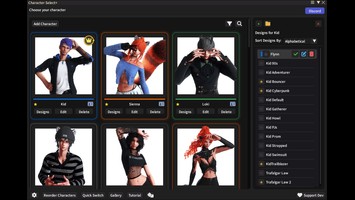
Bring your Glamourer Design Panel to life! Glamourer Preview Manager (GPM) is a companion plugin that enables vertical 9:16 portrait preview cards directly inside your Glamourer design panel.
Key Features:
- Seamless GUI Integration: Renders previews natively below the apply buttons and above the customization lists in Glamourer.
- In-Game Screenshot Crop Tool: Trigger a camera overlay that dims your screen and draws a sky-blue glowing crop box. Take a perfectly cropped portrait shot using [Space] and assign it instantly.
- Auto-Apply on Capture: An optional setting that automatically applies the Glamourer design to your character right before taking the screenshot.
- Aspect Ratio Support: Specifically optimized for vertical screenshots (9:16), but supports 3:4, 1:1 (square), 4:3, and 16:9.
- Middle-Click Zoom: Hold middle-click over the preview to display a full-screen magnifier overlay.
Installation Instructions, source code, etc. for either plugin (custom repository) can be found here:
https://github.com/KaraRemy/PenumbraPreviewManager
https://github.com/KaraRemy/GlamourerPreviewManager
For support, suggestions or feedback, please use either the github issue-tracker or the discord server I created for the plugins:
https://discord.gg/PvxW4mXaWp
To be safe, change the custom repo url to:
https://raw.githubusercontent.com/KaraRemy/TomokPlugins/main/pluginmaster.json
I sincerely apologize for any inconvenience this caused, but it was a neccessary change.
Penumbra Preview Manager (PPM)
Visual Mod Previews Directly Inside Penumbra!
Tired of clicking through options blindly? Penumbra Preview Manager (PPM) is a companion plugin that injects visual preview cards directly inside your native Penumbra Mod Settings window!
Key Features:
- Seamless GUI Integration: Previews render natively inside Penumbra's details pane (above your mod tabs).
- Option Previews & Tooltips: Assign thumbnails to individual checkboxes or dropdown options. An interactive "eye" icon appears next to options with previews, showing tooltips on hover.
- Easy Importing: Copy an image to your clipboard (e.g. Snipping Tool/ShareX) and paste it with one click. Supports local files and direct URLs.
- Mod Creator Portability: All option previews are saved directly inside your mod's folder (ppm.json + ppm/ folder). Zip it up, share it, and anyone else with PPM will see your previews instantly!
- Middle-Click Zoom: Hold middle-click over any preview card to open a full-scale magnifier.
Glamourer Preview Manager (GPM)
Character Preview Cards Directly Inside Glamourer!
Bring your Glamourer Design Panel to life! Glamourer Preview Manager (GPM) is a companion plugin that enables vertical 9:16 portrait preview cards directly inside your Glamourer design panel.
Key Features:
- Seamless GUI Integration: Renders previews natively below the apply buttons and above the customization lists in Glamourer.
- In-Game Screenshot Crop Tool: Trigger a camera overlay that dims your screen and draws a sky-blue glowing crop box. Take a perfectly cropped portrait shot using [Space] and assign it instantly.
- Auto-Apply on Capture: An optional setting that automatically applies the Glamourer design to your character right before taking the screenshot.
- Aspect Ratio Support: Specifically optimized for vertical screenshots (9:16), but supports 3:4, 1:1 (square), 4:3, and 16:9.
- Middle-Click Zoom: Hold middle-click over the preview to display a full-screen magnifier overlay.
Installation Instructions, source code, etc. for either plugin (custom repository) can be found here:
https://github.com/KaraRemy/PenumbraPreviewManager
https://github.com/KaraRemy/GlamourerPreviewManager
For support, suggestions or feedback, please use either the github issue-tracker or the discord server I created for the plugins:
https://discord.gg/PvxW4mXaWp
Primary File or Link:
Github Custom Repository : [ via github.com ]
Other Files and Links:
- PenumbraPreviewManager : [ via github.com ]
- GlamourerPreviewManager : [ via github.com ]
- Discord : [ via discord.gg ]
- Other : [ via raw.githubusercontent.com ]
History:
 Loading Mod History...
Similar Mods