DT Compatibility: ✅ This mod is compatible with Dawntrail.
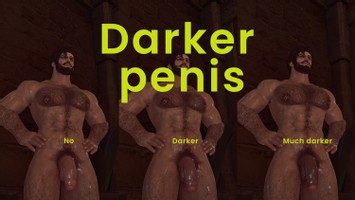
Darker Penis (HR3)
Version: 1.0
NSFW Body by Dadacon
;)
AI Usage: None
Contributor Information:
★ raykie for HR3
Author's Comments:
Hello 🫡
I made this because I felt that the HR3 body would need this mod as well.
Since everyone uses different custom textures for HR3,
I created this to overlay the texture, unlike standard mods.
Please make sure to read the instructions before using it.
------------------------------------------------------
📌 Required Mod
HR3
------------------------------------------------------
📌 Compatible Races
All HR3 Compatible Races
(Roegadyn, Hrothgar)
------------------------------------------------------
📌 Options
Main - Type1, Type2, Type3
Sub - Type1, Type2, Type3
The color gets darker as you go from Type 1 to Type 3.
Please make sure to choose the same Type for both Main and Sub to avoid any color mismatch.
------------------------------------------------------
✍️ How to Use
1. Check the body texture mod your character is currently using through Penumbra.
(e.g., HR3 base mod, HR3 Addon - Hrothgar Extra Textures, HR3 Addon - Roegadyn Body Hair, etc.)
2. Click "Advanced Editing" on that specific mod.
3. Click "Textures" at the top tab.
4. Click the "Diffuse" texture you are currently using from the list on the left.
(It will be highlighted in green.)
The Diffuse texture usually looks like an unfolded white skin texture.
⚠️ IMPORTANT: Please make sure to back up your original texture file!
Once overwritten, this process cannot be undone. ⚠️
5. Click "Show Overlay" in the top right corner.
6. Click the folder icon in the newly opened window on the right.
7. Select the texture you want to apply (Main type1~3).
8. Under "Combine Operation", select "Overlay over input".
If the sizes don't match, adjust the size using "Resizing mode".
9. Click "Save in place" in the middle to save. (You need to hold down both Ctrl + Shift to activate the button.)
10. Click the "Redraw All" button in Penumbra.
11. The "Sub" type is used for "Flaccid Uncut Loose and Erect Uncut Peek"
Look for the _i_d.tex texture highlighted in green from the HR3 base mod,
HR3 Addon - Hrothgar Extra Textures, etc.
(This is the texture for the genitalia only.)
12. Apply the "Sub" texture of the same Type you chose for "Main".
13. Done!
Here is the link for those who want to watch a guide on YouTube 👇
https://youtu.be/BWDQoTkhsqY
------------------------------------------------------
The installation process is a bit different from standard mods, but once you get the hang of it, it’s really easy!
Feedback is always welcome!
Thank you so much! 💖
------------------------------------------------------
⭐ Special Thanks to:
★ HR3 - Raykie
I made this because I felt that the HR3 body would need this mod as well.
Since everyone uses different custom textures for HR3,
I created this to overlay the texture, unlike standard mods.
Please make sure to read the instructions before using it.
------------------------------------------------------
📌 Required Mod
HR3
------------------------------------------------------
📌 Compatible Races
All HR3 Compatible Races
(Roegadyn, Hrothgar)
------------------------------------------------------
📌 Options
Main - Type1, Type2, Type3
Sub - Type1, Type2, Type3
The color gets darker as you go from Type 1 to Type 3.
Please make sure to choose the same Type for both Main and Sub to avoid any color mismatch.
------------------------------------------------------
✍️ How to Use
1. Check the body texture mod your character is currently using through Penumbra.
(e.g., HR3 base mod, HR3 Addon - Hrothgar Extra Textures, HR3 Addon - Roegadyn Body Hair, etc.)
2. Click "Advanced Editing" on that specific mod.
3. Click "Textures" at the top tab.
4. Click the "Diffuse" texture you are currently using from the list on the left.
(It will be highlighted in green.)
The Diffuse texture usually looks like an unfolded white skin texture.
⚠️ IMPORTANT: Please make sure to back up your original texture file!
Once overwritten, this process cannot be undone. ⚠️
5. Click "Show Overlay" in the top right corner.
6. Click the folder icon in the newly opened window on the right.
7. Select the texture you want to apply (Main type1~3).
8. Under "Combine Operation", select "Overlay over input".
If the sizes don't match, adjust the size using "Resizing mode".
9. Click "Save in place" in the middle to save. (You need to hold down both Ctrl + Shift to activate the button.)
10. Click the "Redraw All" button in Penumbra.
11. The "Sub" type is used for "Flaccid Uncut Loose and Erect Uncut Peek"
Look for the _i_d.tex texture highlighted in green from the HR3 base mod,
HR3 Addon - Hrothgar Extra Textures, etc.
(This is the texture for the genitalia only.)
12. Apply the "Sub" texture of the same Type you chose for "Main".
13. Done!
Here is the link for those who want to watch a guide on YouTube 👇
https://youtu.be/BWDQoTkhsqY
------------------------------------------------------
The installation process is a bit different from standard mods, but once you get the hang of it, it’s really easy!
Feedback is always welcome!
Thank you so much! 💖
------------------------------------------------------
⭐ Special Thanks to:
★ HR3 - Raykie
Primary File or Link:
Darker penis(HR3).zip : [ via Direct Download ]
Other Files and Links:
- Other : [ via youtu.be ]
History:
 Loading Mod History...
Similar Mods