DT Compatibility: This mod is only partially functional in Dawntrail. Some parts may be significantly broken or require TT to fix.
Super Fluff Highlight Glow (tail 3 Miqo)
Version: 1.0
Body by aiwyn
;)
Contributor Information / AI Usage:
Super Fluff by nyaimimo
https://xivmodarchive.com/modid/7911
Atramentum Luminis by Nylfae
https://xivmodarchive.com/modid/68013
https://xivmodarchive.com/modid/7911
Atramentum Luminis by Nylfae
https://xivmodarchive.com/modid/68013
Author's Comments:
Adds glow to the super fluff tail 3 highlight.
Credit to nyaimimo for the super fluff tail model and Nylfae for the glow.
Must enable Hair Framework (textures and materials) in Atramentum Luminis 3.0 for glow to work.
The glow intensity depends on the color of the highlights as well as user-determined luminis settings.
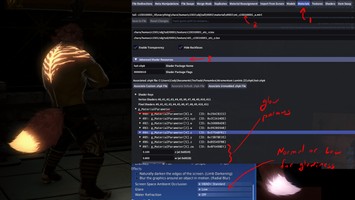
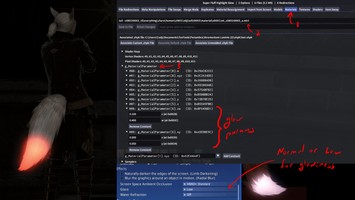
To modify to your preference, navigate to the 'Advanced Editing' tab in Penumbra.
Select the 'Materials' tab and then under 'Select .mtrl File' click on the tail file.
Under 'Advanced Shader Resources' and 'g_Material Parameter' dropdowns are the
glow parameters.
#08 (ID: 0x8F6498D1)
z: glow scaling in well-lit areas
w: glow scaling in dark areas
#09 (ID: 0xA5EDBE5C)
x: bloom scaling in well-lit areas
y: bloom scaling in dark areas
Note: The glow works with the game's glare setting either enabled or disabled, however it is more emissive with it turned on.
Credit to nyaimimo for the super fluff tail model and Nylfae for the glow.
Must enable Hair Framework (textures and materials) in Atramentum Luminis 3.0 for glow to work.
The glow intensity depends on the color of the highlights as well as user-determined luminis settings.
To modify to your preference, navigate to the 'Advanced Editing' tab in Penumbra.
Select the 'Materials' tab and then under 'Select .mtrl File' click on the tail file.
Under 'Advanced Shader Resources' and 'g_Material Parameter' dropdowns are the
glow parameters.
#08 (ID: 0x8F6498D1)
z: glow scaling in well-lit areas
w: glow scaling in dark areas
#09 (ID: 0xA5EDBE5C)
x: bloom scaling in well-lit areas
y: bloom scaling in dark areas
Note: The glow works with the game's glare setting either enabled or disabled, however it is more emissive with it turned on.
Primary File or Link:
Super Fluff Highlight Glow.pmp : [ via Direct Download ]
Other Files and Links:
- Other : [ via xivmodarchive.com ]
- Other : [ via xivmodarchive.com ]
- Other : [ via xivmodarchive.com ]
History:
 Loading Mod History...

Similar Mods