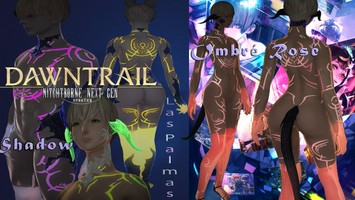
DT Compatibility: This mod is only partially functional in Dawntrail. Some parts may be significantly broken or require TT to fix.
Colorset tattoo - AetherFlux - ALum3 Level T
Version: 1.0
Skin by khanter.kz
;)
AI Usage: None
Contributor Information:
Ny for ALum3
Spiswel for AetherFlux
Spiswel for AetherFlux
Author's Comments:
Vid demonstration 1 https://x.com/DomitorsBane/status/1770489513090973863?s=20
Vid demonstration 2 https://x.com/DomitorsBane/status/1770514254329737333?s=20
Set this the highest priority of anything it conflicts with.
Replaces body materials (a & b), diffuse, normal map and multi from Midlander/Miqo/Elezen, as well as ALum3's effect mask.
ALum3 Level T proof of concept mod, because I haven't seen anyone work with this yet.
Effect mask should be a blue cutout of the tattoo instead of common/texture/blue.tex, but as long as you leave rows 15 and 16 emissive at black color, this shouldn't matter and instead saves space.
Rows 15 and 16 (body base) are slightly bleeding into each other because of BC7 compression in the normal map, again this shouldn't matter because we're not using them.
Row #9 contains our tattoo colors, and it didn't bleed into any other.
Materials used as a base come from my previous mod TBSE - Specular Restored (https://www.xivmodarchive.com/modid/88778), so it will present visible seams with base TBSE materials.
Tattoo will show jagged and white 'untextured' borders depending on your colors picked and light conditions (specially in darker skintones, and using the skin influence multi which at white diffuse color turns the design transparent), this has nothing to do with the tech and everything to do with me haphazardly stitching the textures together with the path of least resistance - again, the textures aren't the point here and I'm not going to clean them up, it's the material tech what should be looked at.
Original design by Spiswel > https://www.xivmodarchive.com/modid/15449
Do not paywall or otherwise monetize any partial or full modification of this framework, nor derivatives of it.
-------------------------
Use Glamourer's Advanced dyes in the body/hands/legs slot's first material to temporarily change the colors, self-explanatory. You can save them as Advanced Dyes. Permanently changing the colors at once requires editing the materials' colorsets through Penumbra.
Gloss Strength will basically delimit your specular color's area of influence.
To tweak the area of influence of the emissive, you will need to go into Penumbra's Advanced Editing > Materials > Material Constants > [ALum] Emissive (Glow) and tweak the strength for dark/well-lit environments (default 0.340 and -5.000).
Comes with two options for diffuse (white tattoo base and no tattoo base) and multi (with and without skin color influence in tattoo area) to experiment with different types of blending.
As usual, colorset information is in the normal map's alpha channel.
This is a tattoo, but I can see this being applied to fingernails, scars, scales, bodysuit textures, etc. 16 rows of completely quickly customizable coloring are a lot!
Vid demonstration 2 https://x.com/DomitorsBane/status/1770514254329737333?s=20
Set this the highest priority of anything it conflicts with.
Replaces body materials (a & b), diffuse, normal map and multi from Midlander/Miqo/Elezen, as well as ALum3's effect mask.
ALum3 Level T proof of concept mod, because I haven't seen anyone work with this yet.
Effect mask should be a blue cutout of the tattoo instead of common/texture/blue.tex, but as long as you leave rows 15 and 16 emissive at black color, this shouldn't matter and instead saves space.
Rows 15 and 16 (body base) are slightly bleeding into each other because of BC7 compression in the normal map, again this shouldn't matter because we're not using them.
Row #9 contains our tattoo colors, and it didn't bleed into any other.
Materials used as a base come from my previous mod TBSE - Specular Restored (https://www.xivmodarchive.com/modid/88778), so it will present visible seams with base TBSE materials.
Tattoo will show jagged and white 'untextured' borders depending on your colors picked and light conditions (specially in darker skintones, and using the skin influence multi which at white diffuse color turns the design transparent), this has nothing to do with the tech and everything to do with me haphazardly stitching the textures together with the path of least resistance - again, the textures aren't the point here and I'm not going to clean them up, it's the material tech what should be looked at.
Original design by Spiswel > https://www.xivmodarchive.com/modid/15449
Do not paywall or otherwise monetize any partial or full modification of this framework, nor derivatives of it.
-------------------------
Use Glamourer's Advanced dyes in the body/hands/legs slot's first material to temporarily change the colors, self-explanatory. You can save them as Advanced Dyes. Permanently changing the colors at once requires editing the materials' colorsets through Penumbra.
Gloss Strength will basically delimit your specular color's area of influence.
To tweak the area of influence of the emissive, you will need to go into Penumbra's Advanced Editing > Materials > Material Constants > [ALum] Emissive (Glow) and tweak the strength for dark/well-lit environments (default 0.340 and -5.000).
Comes with two options for diffuse (white tattoo base and no tattoo base) and multi (with and without skin color influence in tattoo area) to experiment with different types of blending.
As usual, colorset information is in the normal map's alpha channel.
This is a tattoo, but I can see this being applied to fingernails, scars, scales, bodysuit textures, etc. 16 rows of completely quickly customizable coloring are a lot!
Primary File or Link:
Colorset Tattoo ALum3 Level T AetherFlux.pmp : [ via Direct Download ]
Other Files and Links:
- Other : [ via xivmodarchive.com ]
- Other : [ via xivmodarchive.com ]
- Other : [ via x.com ]
- Other : [ via x.com ]
History:
 Loading Mod History...

Similar Mods